

FLUX 3 Max keyframes to video

Pin up to 10 pictures to exact timestamps on a timeline and let FLUX 3 Max animate the transitions between them with matching sound. Works at 24 fps for 5 to 20 second clips in 720p or 1080p.

Keyframes2 to 10 pictures, each pinned to a moment
Try a set
Prompt
0 / 2000
Sign in with Google for 60 free credits, plus up to 120 from check-ins.
0 s5 s10 s

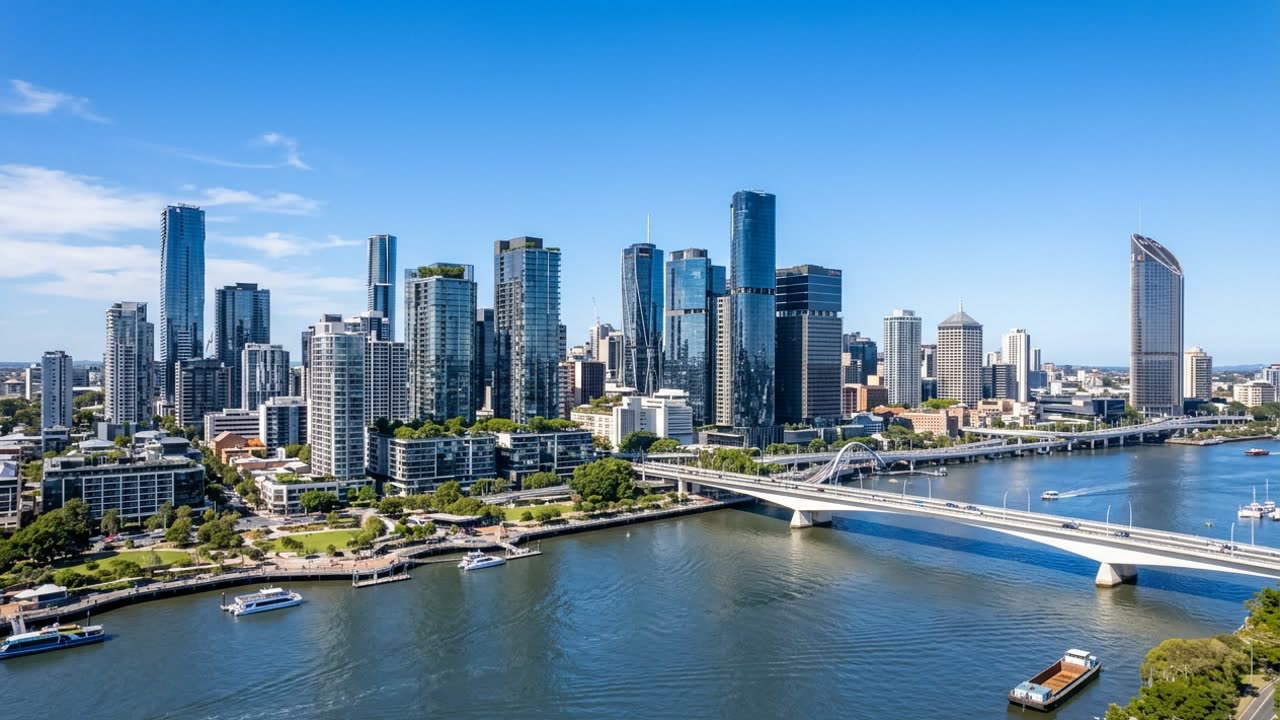
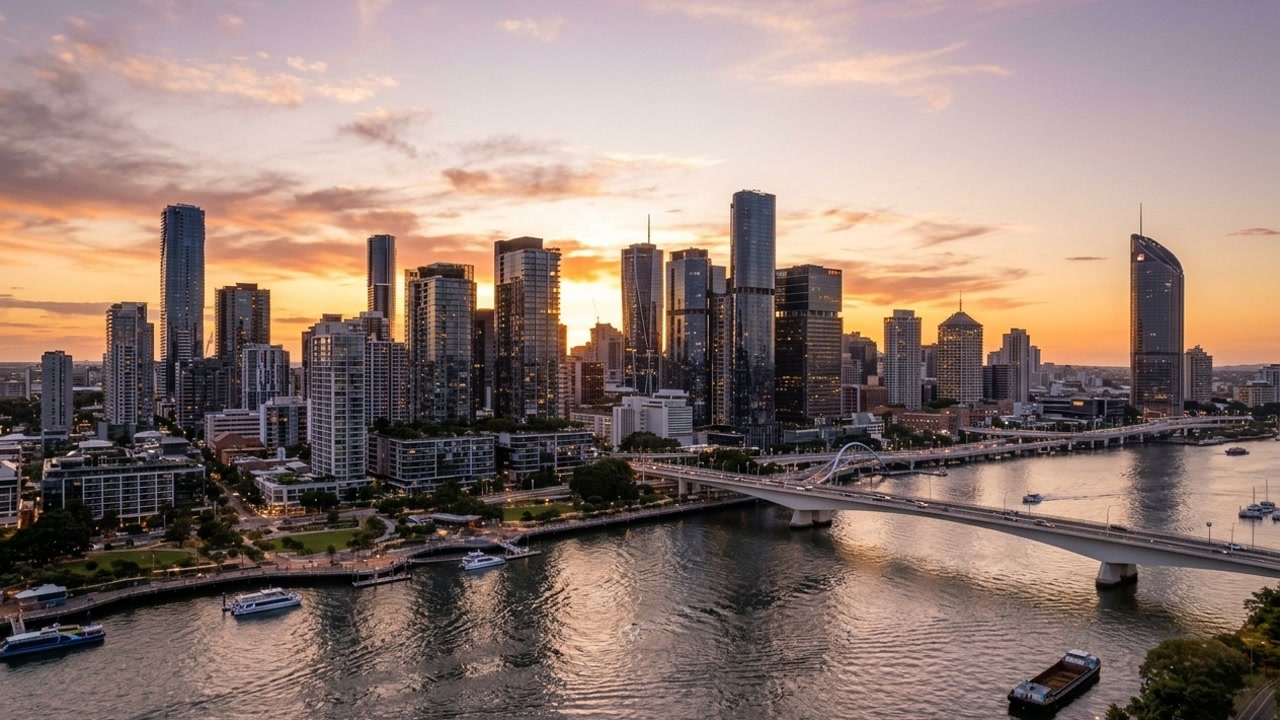
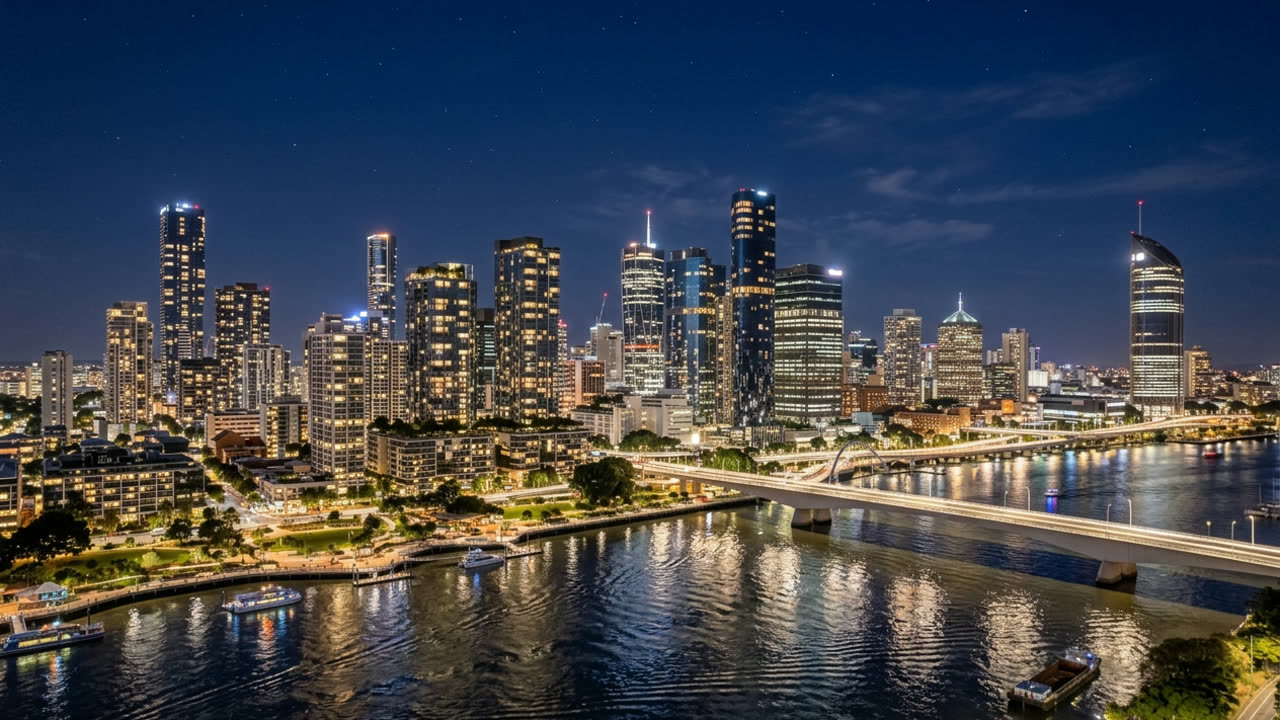
Skyline: day, sunset, night

Time-lapse over the waterfront skyline from midday through sunset into night: clouds race across the sky, the sun sinks behind the towers, windows light up one by one, the river turns from blue to gold to mirrored city lights. A low city hum that fades into evening traffic and night crickets.

180 credits for a 5-second clip at 720p (36 credits/s). Same price as text or image to video.

What keyframes to video is and how it works in FLUX 3 Max

Most AI video tools give you one starting photo, or at best a first and a last frame, and leave everything in the middle to chance. Keyframes to video lets you place multiple keyframe images at exact moments inside the clip so the motion passes through every beat you planned, with native sound generated alongside the picture.

In FLUX 3 Max's keyframes-to-video endpoint on fal, each keyframe is an image URL paired with an integer frame_index in a 24 fps timeline. The frame index equals round(seconds x 24), must be unique across all keyframes, and cannot exceed duration x 24 (for example, frame 0 at 0 s, frame 120 at 5 s and frame 240 at 10 s for a 10-second clip).

The fal endpoint accepts 1 to 10 keyframes per request in PNG, JPEG or WebP. In our browser studio, Keyframes mode takes 2 to 10 pictures on a timeline that snaps in 0.5-second steps; drag a thumbnail or nudge it with the arrow keys, and if you change the clip length, the studio rescales every keyframe proportionally to the nearest free half-second.

For single-photo starts and first-to-last frame pairs, see FLUX 3 Max image to video; for text and prompt templates, see FLUX 3 Max prompts.

Three keyframes clips made on FLUX 3 Max

Every clip below was generated on FLUX 3 Max's keyframes-to-video endpoint with three images pinned at exact timestamps. Click Use this prompt to load the same keyframes and prompt into the studio.

Day -> sunset -> night

Waterfront skyline across three times of day

Three views of the same skyline pinned at the start, middle and end of a 10-second clip. Because the middle sunset frame is pinned at 5 s, the sky shifts from midday blue through gold into night instead of jumping straight to dark.

PromptTime-lapse over the waterfront skyline from midday through sunset into night: clouds race across the sky, the sun sinks behind the towers, windows light up one by one, the river turns from blue to gold to mirrored city lights. A low city hum that fades into evening traffic and night crickets.
  • 10 s · 720p · with sound
  • 0 s (frame 0) -> 5 s (frame 120) -> 10 s (frame 240)
  • 115 s wait
Bud -> half open -> full bloom

A peony unfolds in three stages

With only a bud and an open bloom, a model has to invent the middle stage. Pinning a half-open frame at 4 s gives the clip an intermediate state to pass through before reaching full bloom at 8 s.

PromptA time-lapse of the peony bud slowly unfolding layer by layer into full bloom, dew drops catching the dawn light, the camera holds still with a very slow push-in. Gentle ambient music and morning birds.
  • 8 s · 720p · with sound
  • 0 s (frame 0) -> 4 s (frame 96) -> 8 s (frame 192)
  • 85 s wait
Empty cup -> pour -> latte art

Latte pour anchored in three beats

An empty cup at 0 s, milk pouring from a stainless jug at 3 s and a finished heart of latte art at 6 s. Putting the jug in the middle keyframe introduces the pouring action cleanly without needing a separate video edit.

PromptA barista pours steamed milk into the cup, the white swirl spreads through the espresso and settles into a heart of latte art, soft steam rises, warm morning light, the camera stays still. The hiss of the steam wand and a quiet cafe murmur.
  • 6 s · 720p · with sound
  • 0 s (frame 0) -> 3 s (frame 72) -> 6 s (frame 144)
  • 62 s wait

Keyframes vs first and last frame vs one photo

All three modes run on FLUX 3 Max, support 5 to 20 second clips at 720p or 1080p with sound, and cost 36 credits/s at 720p ($0.30 to $0.36/s) or 62 credits/s at 1080p ($0.52 to $0.61/s).

ModeImages usedWhat you controlBest used for
Keyframes to videoUp to 10 (2 to 10 in studio)Exact moments at 24 fps (0.5 s steps in studio)Multi-stage time-lapses, product reveals with intermediate steps, planned story beats
First and last frame2 (start and end)Opening frame (0 s) and ending frameSimple A-to-B transitions like day to night or closed to open
Image to video1 (first frame)Opening look only; prompt steers the restBringing one portrait, product photo or illustration to life

Keyframes pricing matches text and image to video: 5 s at 720p is 180 credits ($1.50 to $1.78), 10 s is 360 credits ($3.00 to $3.56), and 20 s is 720 credits ($6.00 to $7.13).

Tips for making keyframe pictures that match

Keep the camera, focal length and framing locked unless you intentionally want a camera move. When keyframes jump between unrelated angles, the model has to warp the scene to bridge them.

Edit one base picture into the next stages instead of generating separate scenes from scratch. For our peony and latte clips, the middle and final frames were image-to-image edits of the first frame so the cup, table, petals and lighting stayed consistent.

Leave enough seconds between keyframes for physical motion. Three keyframes spread across 6 to 10 seconds give water, light or petals room to move smoothly; packing many frames into a 5-second clip leaves too little time between beats.

Use the prompt to describe how the scene changes between frames, the camera path and the sound you want to hear. Setting Aspect Ratio to Auto follows your first keyframe; you can also pick 16:9, 9:16, 1:1, 4:3, 3:4, 21:9 or 2:1, and toggle sound on or off.

FLUX 3 Max pricing

A 5-second clip at 720p costs 180 credits (36 a second); 1080p costs 62 a second. Buy a pack once and use it whenever you like. Bigger packs bring the price of a clip down from $1.78 to $1.50.

Starter

$9.90one-time

5clips

$1.78 per clipBase price

1,000 credits

Basic

$19.90one-time

11clips

$1.71 per clipSave 4%

2,100 credits

Pro

$79.90one-time

51clips

$1.56 per clipSave 12%

9,200 credits

Studio

$149.90one-time

100clips

$1.50 per clipSave 16%

18,000 credits

Keyframes mode costs 36 credits/s at 720p ($0.30 to $0.36/s) and 62 credits/s at 1080p ($0.52 to $0.61/s), the same as text and image to video.

Secure one-time checkout through Stripe. Buying a pack only adds credits to your account. USD prices. Review the final amount and any applicable tax at checkout before paying. Credits do not automatically renew, and unused credits can be refunded within 7 days of purchase. The credit cost shows before each video; finished results need no second payment to view or download.

FLUX 3 Max keyframes questions

How many keyframes can I use in FLUX 3 Max?

fal's keyframes-to-video endpoint accepts 1 to 10 keyframe images per clip. In our studio timeline, Keyframes mode requires 2 to 10 images so you have at least two moments to interpolate between; for a single photo, use Image to video.

How does frame timing work at 24 fps?

FLUX 3 Max outputs 24 fps video. Each keyframe timestamp in seconds maps to frame_index = round(seconds x 24), from 0 up to duration x 24, and every frame_index must be unique. In the studio you move frames in 0.5-second steps.

Does keyframes to video cost more than text or image to video?

No. Billing is per second of generated video at the same rate: 36 credits a second at 720p and 62 credits a second at 1080p (180 credits for a 5-second 720p clip).

What happens if I change the video length after placing keyframes?

In the studio, changing the duration keeps each keyframe at the same proportion of the clip and snaps it to the nearest free 0.5-second step, so your beats stay in order.

Which image formats and aspect ratios are supported?

Keyframes can be PNG, JPEG or WebP (up to 20 MB per image here). Aspect ratio defaults to Auto (which follows your first keyframe) or can be set to 21:9, 2:1, 16:9, 4:3, 1:1, 3:4 or 9:16.

Does keyframes mode generate sound too?

Yes. Sound is on by default and generated together with the video, or you can switch Sound off in Settings before pressing Generate.

Is this an official FLUX 3 Max keyframes tool?

Flux3Max.io is an independent service. It is not affiliated with, endorsed by or sponsored by Black Forest Labs or fal; FLUX is a trademark of Black Forest Labs, and model names belong to their owners.

More about FLUX 3 Max

One account and one set of credits for every page.

Try FLUX 3 Max keyframes

New accounts get 60 free credits when they sign up with Google, plus 120 more from a 7-day check-in (180 total for one 5-second 720p clip). A failed video costs nothing.