

FLUX 3 Max first and last frame AI video

Give FLUX 3 Max a starting photo and an ending photo, describe what happens in between, and get a 5 to 20 second video with sound that begins on the first frame and lands on the last.

First frameJPG, PNG or WebP · up to 20 MB
No photo? Try one:
Prompt
0 / 2000
Sign in with Google for 60 free credits, plus up to 120 from check-ins.

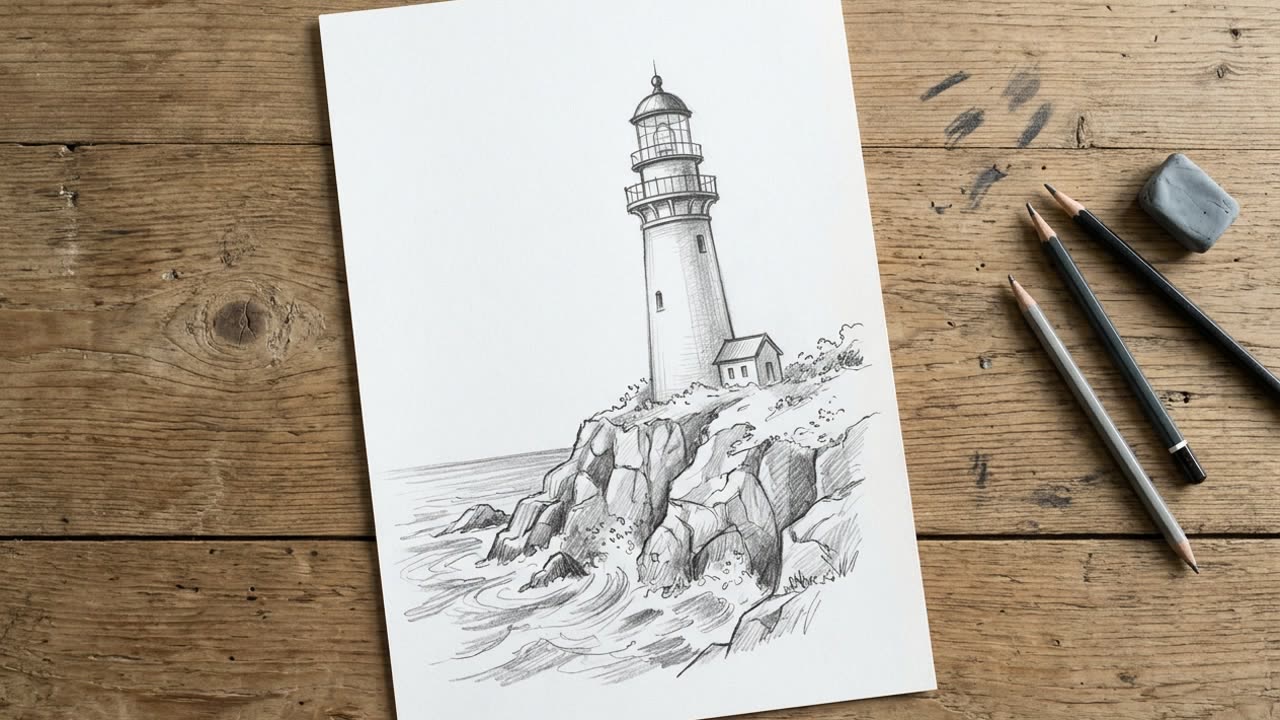
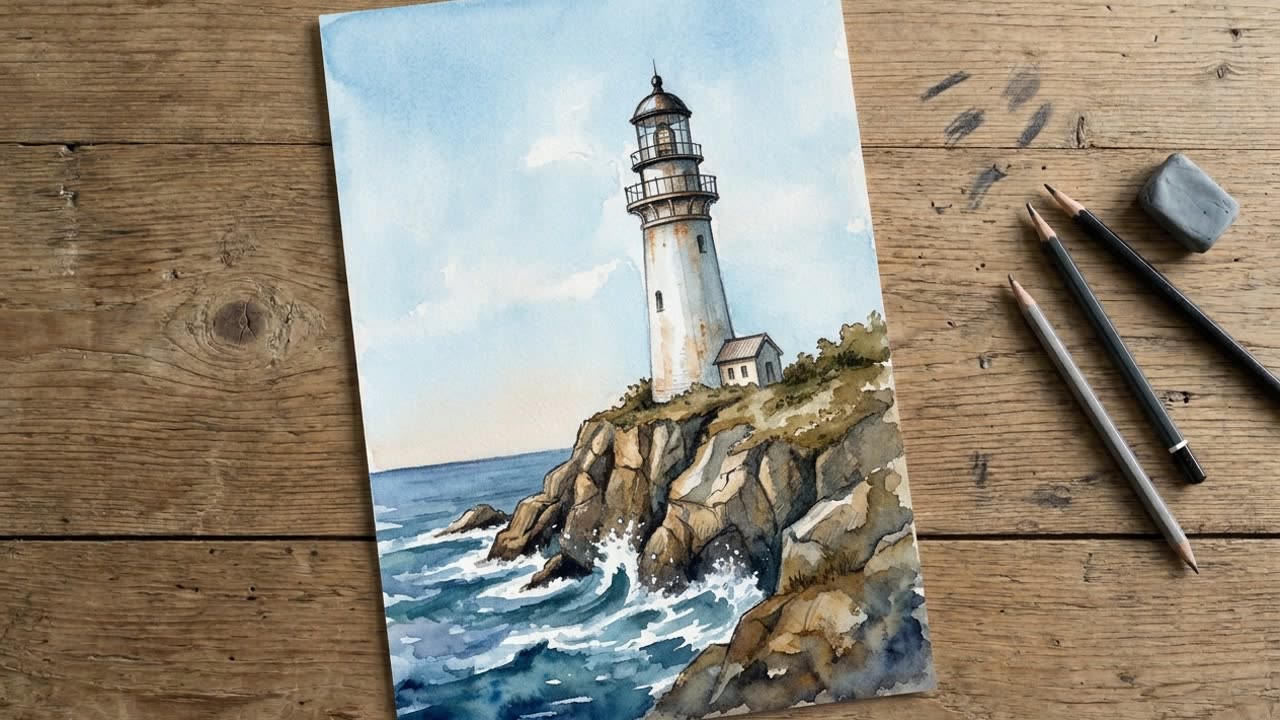
Pencil sketch to watercolor lighthouse

The pencil lines on the white paper fill in smoothly with watercolor washes, blue sky first, then sea and rocks, while the camera holds completely still over the desk. Crisp audible watercolor brush strokes swishing across textured paper, a brush tapping a ceramic water cup, and gentle acoustic guitar.

180 credits for a 5-second clip at 720p (36 credits/s). Failed videos are free.

How first and last frame video works in FLUX 3 Max

When you animate a single photo, the model decides where the shot goes at the end. Giving it both a start and end frame locks down the destination: the clip opens on your first image, performs the motion and sound you describe, and resolves cleanly into your final image.

Under the hood, the studio sends both pictures to FLUX 3 Max's image-to-video endpoint on fal, passing your starting picture as image_url and your ending picture as end_image_url (PNG, JPEG or WebP; up to 20 MB per photo here). Clips run 5 to 20 whole seconds at 24 fps in 720p or 1080p, with generated sound on by default or switched off in Settings.

With Ratio set to Auto, the video follows the shape of your first frame, or you can pick 16:9, 9:16, 1:1, 4:3, 3:4, 21:9 or 2:1. Every uploaded photo is checked automatically before generation and deleted about a day later.

Six first and last frame clips we ran on FLUX 3 Max

Each example below started from two matching pictures we generated ourselves. Click Use this prompt to load both frames, the settings and the exact words into the studio.

Sketch to painting

A pencil lighthouse fills in with watercolor

First frame: a graphite sketch of a lighthouse on white paper resting on a wooden desk. Last frame: an edit of that exact photo turned into a finished watercolor painting. Because the paper and pencils stay locked in both frames, the camera holds still while washes of sky, sea and rock fill the drawing.

PromptThe pencil lines on the white paper fill in smoothly with watercolor washes, blue sky first, then sea and rocks, while the camera holds completely still over the desk. Crisp audible watercolor brush strokes swishing across textured paper, a brush tapping a ceramic water cup, and gentle acoustic guitar.
  • 6 s · 720p · with sound
  • 26 s wait
Product unboxing

A frosted skincare jar twists open

First frame: a closed frosted-glass jar on a pale travertine pedestal. Last frame: the same jar with its matte lid resting beside it and a smooth swirl of cream visible inside. The model lifts the lid off and settles it next to the jar in five seconds.

PromptThe lid twists and lifts gently away from the frosted-glass jar to rest beside it on the stone pedestal as studio light glints on the smooth swirl of cream, slow subtle push-in. Soft glass clink and a gentle airy tone.
  • 5 s · 720p · with sound
  • 19 s wait
Action beat

Looking up from a phone to smile and wave

First frame: a fictional young man looking down at a phone in a park. Last frame: the same man looking up at the camera smiling and waving. Both face and fingers stay consistent through the motion, though the park audio track on this run came back very quiet (-44.4 dB mean).

PromptThe young man lifts his head from his phone, looks toward the camera with a warm smile, lowers the phone and raises his hand in a friendly wave while sunlit leaves sway behind him. Park ambience, singing birds and distant muffled kids.
  • 5 s · 720p · quiet audio
  • 39 s wait
Time passing

Waterfront skyline from midday to night

Noon sunlight in the first frame and lit towers reflected in dark water in the last. Clouds race past, sunset washes across the glass facades, and office windows flicker on in sequence.

PromptTime-lapse from midday to night over the waterfront skyline: clouds race by, the sun sets, the towers light up window by window, the river turns to mirrored lights. A low city hum that turns into night crickets.
  • 10 s · 720p · with sound
  • 28 s wait
Before and after

A peony bud opens into full bloom

A closed pink bud and the opened bloom in the same garden framing. Over eight seconds the petals unfold layer by layer in dawn light without jumping camera angles.

PromptA time-lapse of the peony bud slowly unfolding into full bloom, petals opening layer by layer in the dawn light, the camera holds still. Gentle ambient music and morning birds.
  • 8 s · 720p · with sound
  • 30 s wait
Room reveal

An empty living room corner fills with a lit tree

First frame: a bare wooden floor by a twilight window. Last frame: the same corner with a decorated Christmas tree, glowing fairy lights, wrapped gifts and snow falling outside. Keeping the window and floorboards identical anchors the reveal.

PromptThe Christmas tree appears in the living room corner and its warm fairy lights switch on string by string as wrapped gifts gather underneath and snow begins falling outside the window, locked-off cozy shot. A soft music-box melody and a crackling fireplace.
  • 8 s · 720p · with sound
  • 42 s wait

How to make a matching last frame, and what it works best for

Every pair on this page was made the same way: generate or take the first frame, then create the last frame as an image-to-image edit of that first picture while keeping the camera position, lens and background intact. Two unrelated photos with different framing force the video to morph awkwardly in the middle.

First and last frame transitions shine when there is a clear visual bridge between two states: before-and-after room transformations, product unboxing or lid reveals, sketch-to-finished-art time-lapses, day-to-night lighting shifts, or a subject changing pose from frame A to frame B.

Spend the prompt on the physical motion, order of events and sound between the two images rather than re-describing static objects already visible in both pictures. Naming specific sounds (brush strokes on paper, a glass clink, crackling fire) gives stronger audio tracks than vague ambience cues.

First and last frame vs keyframes vs one photo

All three run on FLUX 3 Max at the same per-second rate: 36 credits/s at 720p ($0.30 to $0.36/s) and 62 credits/s at 1080p ($0.52 to $0.61/s).

ModeImages usedWhat it controlsChoose it when
First and last frame2 (start and end)Opening frame (0 s) and final frameYou want a clean A-to-B transition, reveal or before-and-after clip
Keyframes to videoUp to 10 on a 24 fps timelineExact pictures pinned at intermediate timestampsYou need to steer a middle stage too (day -> sunset -> night)
Image to video1 (first frame)Opening look only; prompt guides the motionYou have one photo and want the model to invent how it unfolds

5 s at 720p costs 180 credits ($1.50 to $1.78); 10 s at 720p costs 360 credits ($3.00 to $3.56); 20 s at 720p costs 720 credits ($6.00 to $7.13).

FLUX 3 Max pricing

A 5-second clip at 720p costs 180 credits (36 a second); 1080p costs 62 a second. Buy a pack once and use it whenever you like. Bigger packs bring the price of a clip down from $1.78 to $1.50.

Starter

$9.90one-time

5clips

$1.78 per clipBase price

1,000 credits

Basic

$19.90one-time

11clips

$1.71 per clipSave 4%

2,100 credits

Pro

$79.90one-time

51clips

$1.56 per clipSave 12%

9,200 credits

Studio

$149.90one-time

100clips

$1.50 per clipSave 16%

18,000 credits

Adding a last frame adds no extra charge: 36 credits/s at 720p ($0.30 to $0.36/s) and 62 credits/s at 1080p ($0.52 to $0.61/s).

Secure one-time checkout through Stripe. Buying a pack only adds credits to your account. USD prices. Review the final amount and any applicable tax at checkout before paying. Credits do not automatically renew, and unused credits can be refunded within 7 days of purchase. The credit cost shows before each video; finished results need no second payment to view or download.

First and last frame AI video questions

How does FLUX 3 Max first and last frame work?

Switch the studio to Image mode, upload your starting picture in First frame and your ending picture in Last frame, then describe the transition and sound. The model generates a 5 to 20 second clip that begins on your first image and ends on your second.

Does adding a last frame cost more credits?

No. Billing is per second of generated video, identical to single-photo or text-to-video: 36 credits/s at 720p (180 credits for 5 seconds) and 62 credits/s at 1080p.

Do the first and last frames need to share the same aspect ratio?

Yes, matching framing and aspect ratio give the cleanest results. With Ratio on Auto, FLUX 3 Max follows your first image, so cropping or editing the first frame into the last frame prevents jarring zooms or warps.

Can I add middle frames between the start and end?

Yes. Switch to Keyframes mode to pin up to 10 pictures at exact timestamps along a 24 fps timeline instead of only the start and end.

What file formats and sizes are accepted?

JPG, PNG and WebP images up to 20 MB each. Uploaded frames are checked automatically before generation and deleted after about one day.

Whose photos can I upload?

Only photos you have the right to use: your own, or an adult's who has clearly agreed. Photos of children, celebrities or people who have not agreed are not allowed. See the Content Policy.

Is this an official Black Forest Labs or fal tool?

Flux3Max.io is an independent service. It is not affiliated with, endorsed by or sponsored by Black Forest Labs or fal; FLUX is a trademark of Black Forest Labs, and model names belong to their owners.

More about FLUX 3 Max

One account and one set of credits for every page.

Try first and last frame on FLUX 3 Max

New accounts get 60 free credits when they sign up with Google, plus 120 more from a 7-day check-in (180 total for one 5-second 720p clip). A failed video costs nothing.